Auto-Completing Discord Orbs Quest

Learn how to receive Orbs rewards without watching videos or playing games for Discord Orbs quests.
TL;DR
Using a Discord Quest auto-completion script, you can receive Orbs without watching videos or playing games.
Run developer tools -> Paste script -> Complete quest
What is Discord Orbs Quest?
Discord offers a virtual currency called Orbs that can be used to purchase various items. Orbs can be earned as rewards by completing Discord Quests, which require watching videos or playing games.
Types and Rewards of Discord Orbs Quests
Discord Quests are divided into two main types:
Video watching type: Quests that require watching promotional videos (WATCH_VIDEO, WATCH_VIDEO_ON_MOBILE)
Game/Program execution type: Quests that require playing or streaming specific games (PLAY_ON_DESKTOP, STREAM_ON_DESKTOP, PLAY_ACTIVITY)
Rewards
- Discord Orbs: Most quests reward 700 Orbs.
- Avatar decorations / Profile effects
- Game codes and items
Receiving Orbs Without Completing Quests
As mentioned earlier, Discord Orbs Quests require watching videos or playing games. However, there are two ways to receive Orbs without completing the quests:
- Using a script
- Renaming an arbitrary .exe file to a game executable name1
This post explains the script method.
Using the Script
Completing quests through scripts may violate Discord's Terms of Service and could result in penalties such as account suspension. Proceed at your own risk.
Searching the internet reveals excellent existing solutions. You can use a script that automatically completes Discord Orbs Quests, which helps bypass the quest system to complete automatically and receive Orbs. It supports all types of quests.
How the Script Works
- Access Discord client's internal module system
- Manipulate game execution status or directly call APIs
- Disguise as normal progress status and send to server
Prerequisites
Since browsers have limited game execution detection functionality, you need the Discord desktop app to complete game/program execution type quests.
You also need to open DevTools to run the script, but by default, Discord desktop app cannot open DevTools due to security settings. Therefore, you need to follow these steps:
Use method 2 if you find it tedious.
Method 1: Modify Discord settings.json file
- Open the
settings.jsonfile at the path below according to your OS.
macOS: ~/Library/Application Support/discord/settings.json
Windows: %appdata%/discord/settings.json
- Add the following content:
{
// Existing settings...
  "DANGEROUS_ENABLE_DEVTOOLS_ONLY_ENABLE_IF_YOU_KNOW_WHAT_YOURE_DOING": true
}
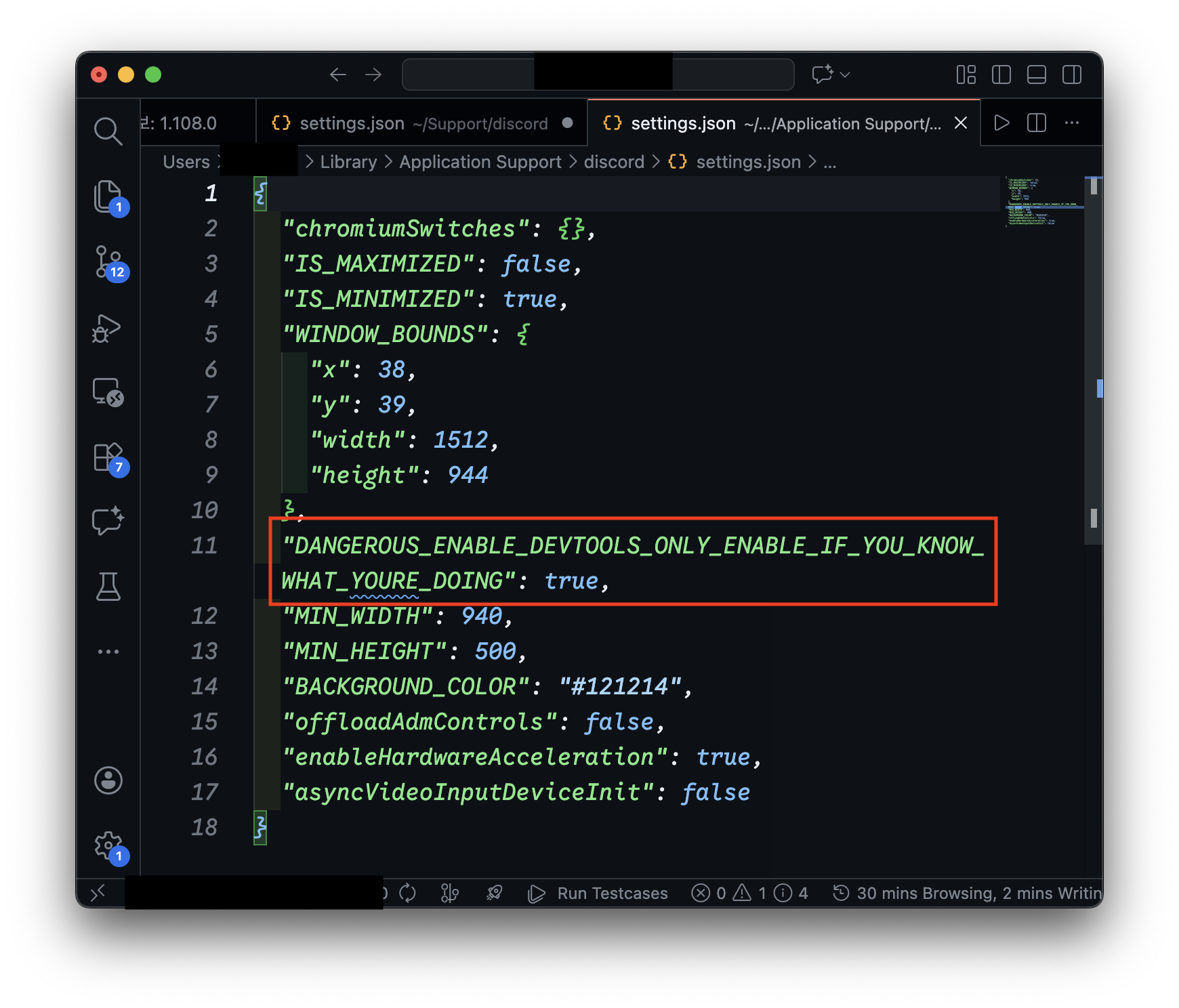
- Restart the Discord app.
Method 2: Use Canary or PTB version
Discord's Canary or PTB (Public Test Build) versions have DevTools enabled by default. Install and use these versions.
- canary
-1.png)
- PTB
How to Run the Script


- Copy the script code from the code block below / gist page.
View Script Code
delete window.$;
let wpRequire = webpackChunkdiscord_app.push([[Symbol()], {}, r => r]);
webpackChunkdiscord_app.pop();

let ApplicationStreamingStore = Object.values(wpRequire.c).find(x => x?.exports?.Z?.__proto__?.getStreamerActiveStreamMetadata)?.exports?.Z;
let RunningGameStore, QuestsStore, ChannelStore, GuildChannelStore, FluxDispatcher, api
if(!ApplicationStreamingStore) {
	ApplicationStreamingStore = Object.values(wpRequire.c).find(x => x?.exports?.A?.__proto__?.getStreamerActiveStreamMetadata).exports.A;
	RunningGameStore = Object.values(wpRequire.c).find(x => x?.exports?.Ay?.getRunningGames).exports.Ay;
	QuestsStore = Object.values(wpRequire.c).find(x => x?.exports?.A?.__proto__?.getQuest).exports.A;
	ChannelStore = Object.values(wpRequire.c).find(x => x?.exports?.A?.__proto__?.getAllThreadsForParent).exports.A;
	GuildChannelStore = Object.values(wpRequire.c).find(x => x?.exports?.Ay?.getSFWDefaultChannel).exports.Ay;
	FluxDispatcher = Object.values(wpRequire.c).find(x => x?.exports?.h?.__proto__?.flushWaitQueue).exports.h;
	api = Object.values(wpRequire.c).find(x => x?.exports?.Bo?.get).exports.Bo;
} else {
	RunningGameStore = Object.values(wpRequire.c).find(x => x?.exports?.ZP?.getRunningGames).exports.ZP;
	QuestsStore = Object.values(wpRequire.c).find(x => x?.exports?.Z?.__proto__?.getQuest).exports.Z;
	ChannelStore = Object.values(wpRequire.c).find(x => x?.exports?.Z?.__proto__?.getAllThreadsForParent).exports.Z;
	GuildChannelStore = Object.values(wpRequire.c).find(x => x?.exports?.ZP?.getSFWDefaultChannel).exports.ZP;
	FluxDispatcher = Object.values(wpRequire.c).find(x => x?.exports?.Z?.__proto__?.flushWaitQueue).exports.Z;
	api = Object.values(wpRequire.c).find(x => x?.exports?.tn?.get).exports.tn;
}

const supportedTasks = ["WATCH_VIDEO", "PLAY_ON_DESKTOP", "STREAM_ON_DESKTOP", "PLAY_ACTIVITY", "WATCH_VIDEO_ON_MOBILE"]
let quests = [...QuestsStore.quests.values()].filter(x => x.userStatus?.enrolledAt && !x.userStatus?.completedAt && new Date(x.config.expiresAt).getTime() > Date.now() && supportedTasks.find(y => Object.keys((x.config.taskConfig ?? x.config.taskConfigV2).tasks).includes(y)))
let isApp = typeof DiscordNative !== "undefined"
if(quests.length === 0) {
	console.log("You don't have any uncompleted quests!")
} else {
	let doJob = function() {
		const quest = quests.pop()
		if(!quest) return

		const pid = Math.floor(Math.random() * 30000) + 1000

		const applicationId = quest.config.application.id
		const applicationName = quest.config.application.name
		const questName = quest.config.messages.questName
		const taskConfig = quest.config.taskConfig ?? quest.config.taskConfigV2
		const taskName = supportedTasks.find(x => taskConfig.tasks[x] != null)
		const secondsNeeded = taskConfig.tasks[taskName].target
		let secondsDone = quest.userStatus?.progress?.[taskName]?.value ?? 0

		if(taskName === "WATCH_VIDEO" || taskName === "WATCH_VIDEO_ON_MOBILE") {
			const maxFuture = 10, speed = 7, interval = 1
			const enrolledAt = new Date(quest.userStatus.enrolledAt).getTime()
			let completed = false
			let fn = async () => {
				while(true) {
					const maxAllowed = Math.floor((Date.now() - enrolledAt)/1000) + maxFuture
					const diff = maxAllowed - secondsDone
					const timestamp = secondsDone + speed
					if(diff >= speed) {
						const res = await api.post({url: `/quests/${quest.id}/video-progress`, body: {timestamp: Math.min(secondsNeeded, timestamp + Math.random())}})
						completed = res.body.completed_at != null
						secondsDone = Math.min(secondsNeeded, timestamp)
					}

					if(timestamp >= secondsNeeded) {
						break
					}
					await new Promise(resolve => setTimeout(resolve, interval * 1000))
				}
				if(!completed) {
					await api.post({url: `/quests/${quest.id}/video-progress`, body: {timestamp: secondsNeeded}})
				}
				console.log("Quest completed!")
				doJob()
			}
			fn()
			console.log(`Spoofing video for ${questName}.`)
		} else if(taskName === "PLAY_ON_DESKTOP") {
			if(!isApp) {
				console.log("This no longer works in browser for non-video quests. Use the discord desktop app to complete the", questName, "quest!")
			} else {
				api.get({url: `/applications/public?application_ids=${applicationId}`}).then(res => {
					const appData = res.body[0]
					const exeName = appData.executables.find(x => x.os === "win32").name.replace(">","")

					const fakeGame = {
						cmdLine: `C:\\Program Files\\${appData.name}\\${exeName}`,
						exeName,
						exePath: `c:/program files/${appData.name.toLowerCase()}/${exeName}`,
						hidden: false,
						isLauncher: false,
						id: applicationId,
						name: appData.name,
						pid: pid,
						pidPath: [pid],
						processName: appData.name,
						start: Date.now(),
					}
					const realGames = RunningGameStore.getRunningGames()
					const fakeGames = [fakeGame]
					const realGetRunningGames = RunningGameStore.getRunningGames
					const realGetGameForPID = RunningGameStore.getGameForPID
					RunningGameStore.getRunningGames = () => fakeGames
					RunningGameStore.getGameForPID = (pid) => fakeGames.find(x => x.pid === pid)
					FluxDispatcher.dispatch({type: "RUNNING_GAMES_CHANGE", removed: realGames, added: [fakeGame], games: fakeGames})

					let fn = data => {
						let progress = quest.config.configVersion === 1 ? data.userStatus.streamProgressSeconds : Math.floor(data.userStatus.progress.PLAY_ON_DESKTOP.value)
						console.log(`Quest progress: ${progress}/${secondsNeeded}`)

						if(progress >= secondsNeeded) {
							console.log("Quest completed!")

							RunningGameStore.getRunningGames = realGetRunningGames
							RunningGameStore.getGameForPID = realGetGameForPID
							FluxDispatcher.dispatch({type: "RUNNING_GAMES_CHANGE", removed: [fakeGame], added: [], games: []})
							FluxDispatcher.unsubscribe("QUESTS_SEND_HEARTBEAT_SUCCESS", fn)

							doJob()
						}
					}
					FluxDispatcher.subscribe("QUESTS_SEND_HEARTBEAT_SUCCESS", fn)

					console.log(`Spoofed your game to ${applicationName}. Wait for ${Math.ceil((secondsNeeded - secondsDone) / 60)} more minutes.`)
				})
			}
		} else if(taskName === "STREAM_ON_DESKTOP") {
			if(!isApp) {
				console.log("This no longer works in browser for non-video quests. Use the discord desktop app to complete the", questName, "quest!")
			} else {
				let realFunc = ApplicationStreamingStore.getStreamerActiveStreamMetadata
				ApplicationStreamingStore.getStreamerActiveStreamMetadata = () => ({
					id: applicationId,
					pid,
					sourceName: null
				})

				let fn = data => {
					let progress = quest.config.configVersion === 1 ? data.userStatus.streamProgressSeconds : Math.floor(data.userStatus.progress.STREAM_ON_DESKTOP.value)
					console.log(`Quest progress: ${progress}/${secondsNeeded}`)

					if(progress >= secondsNeeded) {
						console.log("Quest completed!")

						ApplicationStreamingStore.getStreamerActiveStreamMetadata = realFunc
						FluxDispatcher.unsubscribe("QUESTS_SEND_HEARTBEAT_SUCCESS", fn)

						doJob()
					}
				}
				FluxDispatcher.subscribe("QUESTS_SEND_HEARTBEAT_SUCCESS", fn)

				console.log(`Spoofed your stream to ${applicationName}. Stream any window in vc for ${Math.ceil((secondsNeeded - secondsDone) / 60)} more minutes.`)
				console.log("Remember that you need at least 1 other person to be in the vc!")
			}
		} else if(taskName === "PLAY_ACTIVITY") {
			const channelId = ChannelStore.getSortedPrivateChannels()[0]?.id ?? Object.values(GuildChannelStore.getAllGuilds()).find(x => x != null && x.VOCAL.length > 0).VOCAL[0].channel.id
			const streamKey = `call:${channelId}:1`

			let fn = async () => {
				console.log("Completing quest", questName, "-", quest.config.messages.questName)

				while(true) {
					const res = await api.post({url: `/quests/${quest.id}/heartbeat`, body: {stream_key: streamKey, terminal: false}})
					const progress = res.body.progress.PLAY_ACTIVITY.value
					console.log(`Quest progress: ${progress}/${secondsNeeded}`)

					await new Promise(resolve => setTimeout(resolve, 20 * 1000))

					if(progress >= secondsNeeded) {
						await api.post({url: `/quests/${quest.id}/heartbeat`, body: {stream_key: streamKey, terminal: true}})
						break
					}
				}

				console.log("Quest completed!")
				doJob()
			}
			fn()
		}
	}
	doJob()
}
Annotated version for code understanding (by Claude)
/*
============================================================
 * Function: Bypass Discord's Quest system for auto-completion
 * Supported Quest types:
 * - WATCH_VIDEO / WATCH_VIDEO_ON_MOBILE: Video watching
 * - PLAY_ON_DESKTOP: Game execution
 * - STREAM_ON_DESKTOP: Screen sharing
 * - PLAY_ACTIVITY: Voice channel activity
 *
 * How it works:
 * 1. Access Discord client's internal module system
 * 2. Manipulate game execution status or directly call APIs
 * 3. Disguise as normal progress status and send to server
 * ============================================================
 */

// ============================================================
// 0. Environment initialization
// ============================================================
// Remove global variable $ to prevent conflicts with jQuery and other libraries
delete window.$;

// ============================================================
// 1. Hijack Webpack module loader (require function)
// ============================================================
// Discord is bundled with Webpack, and all internal modules are
// managed through the webpackChunkdiscord_app array.
// Push a temporary module to this array to extract the require function.
let wpRequire = webpackChunkdiscord_app.push([
    [Symbol()],  // Unique identifier
    {},          // Empty module definition
    r => r       // Callback that returns require function
]);
webpackChunkdiscord_app.pop(); // Remove injected temporary module (clean up traces)

// ============================================================
// 2. Search for necessary internal Store and utility modules
// ============================================================
// Discord's internal code is obfuscated and structure may vary by version.
// Find modules with specific method signatures to extract needed Stores.

// ApplicationStreamingStore: Manages screen sharing (streaming) status
let ApplicationStreamingStore = Object.values(wpRequire.c).find(
    x => x?.exports?.Z?.__proto__?.getStreamerActiveStreamMetadata
)?.exports?.Z;

// Declare variables for remaining Stores
let RunningGameStore,      // Manages running game list
    QuestsStore,           // Manages Quest information and progress status
    ChannelStore,          // Manages channel information
    GuildChannelStore,     // Manages guild (server) channel information
    FluxDispatcher,        // Event publish/subscribe system
    api;                   // HTTP API client

// ============================================================
// 2-1. Handle module export pattern branching
// ============================================================
// Depending on Discord version, modules may be located in exports.A or exports.Z etc.
// Support both patterns to ensure compatibility.

if(!ApplicationStreamingStore) {
    // Pattern A: exports.A, exports.Ay, exports.h, exports.Bo
    // (Used in some Discord versions)
    ApplicationStreamingStore = Object.values(wpRequire.c).find(
        x => x?.exports?.A?.__proto__?.getStreamerActiveStreamMetadata
    ).exports.A;

    RunningGameStore = Object.values(wpRequire.c).find(
        x => x?.exports?.Ay?.getRunningGames
    ).exports.Ay;

    QuestsStore = Object.values(wpRequire.c).find(
        x => x?.exports?.A?.__proto__?.getQuest
    ).exports.A;

    ChannelStore = Object.values(wpRequire.c).find(
        x => x?.exports?.A?.__proto__?.getAllThreadsForParent
    ).exports.A;

    GuildChannelStore = Object.values(wpRequire.c).find(
        x => x?.exports?.Ay?.getSFWDefaultChannel
    ).exports.Ay;

    FluxDispatcher = Object.values(wpRequire.c).find(
        x => x?.exports?.h?.__proto__?.flushWaitQueue
    ).exports.h;

    api = Object.values(wpRequire.c).find(
        x => x?.exports?.Bo?.get
    ).exports.Bo;

} else {
    // Pattern B: exports.Z, exports.ZP, exports.tn
    // (Used in most Discord versions)
    RunningGameStore = Object.values(wpRequire.c).find(
        x => x?.exports?.ZP?.getRunningGames
    ).exports.ZP;

    QuestsStore = Object.values(wpRequire.c).find(
        x => x?.exports?.Z?.__proto__?.getQuest
    ).exports.Z;

    ChannelStore = Object.values(wpRequire.c).find(
        x => x?.exports?.Z?.__proto__?.getAllThreadsForParent
    ).exports.Z;

    GuildChannelStore = Object.values(wpRequire.c).find(
        x => x?.exports?.ZP?.getSFWDefaultChannel
    ).exports.ZP;

    FluxDispatcher = Object.values(wpRequire.c).find(
        x => x?.exports?.Z?.__proto__?.flushWaitQueue
    ).exports.Z;

    api = Object.values(wpRequire.c).find(
        x => x?.exports?.tn?.get
    ).exports.tn;
}

// ============================================================
// 3. Filter executable Quest list
// ============================================================
// Define Quest task types that this script can handle
const supportedTasks = [
    "WATCH_VIDEO",              // Video watching (browser/app)
    "PLAY_ON_DESKTOP",          // Game execution (app only)
    "STREAM_ON_DESKTOP",        // Screen sharing (app only)
    "PLAY_ACTIVITY",            // Activity participation
    "WATCH_VIDEO_ON_MOBILE"     // Mobile video watching
];

// Extract currently executable Quests from QuestsStore
// Filtering conditions:
// 1. Enrolled (userStatus.enrolledAt exists)
// 2. Not completed (!userStatus.completedAt)
// 3. Before expiration (config.expiresAt > current time)
// 4. Contains supported task type
let quests = [...QuestsStore.quests.values()].filter(x =>
    x.userStatus?.enrolledAt &&
    !x.userStatus?.completedAt &&
    new Date(x.config.expiresAt).getTime() > Date.now() &&
    supportedTasks.find(y =>
        Object.keys((x.config.taskConfig ?? x.config.taskConfigV2).tasks).includes(y)
    )
);

// Detect execution environment
// Distinguish desktop app/browser by DiscordNative object existence
let isApp = typeof DiscordNative !== "undefined";

// ============================================================
// 4. Quest execution main logic
// ============================================================
if(quests.length === 0) {
    // When there are no Quests to execute
    console.log("You don't have any uncompleted quests!");

} else {
    // --------------------------------------------------------
    // 4-1. Quest sequential processing function (recursive call)
    // --------------------------------------------------------
    let doJob = function() {
        const quest = quests.pop(); // Get one Quest from array
        if(!quest) return; // Exit when all Quests are completed

        // Generate fake process ID (range 1000~30999)
        const pid = Math.floor(Math.random() * 30000) + 1000;

        // Extract Quest configuration values
        const applicationId = quest.config.application.id;           // Target app ID
        const applicationName = quest.config.application.name;       // Target app name
        const questName = quest.config.messages.questName;           // Quest display name
        const taskConfig = quest.config.taskConfig ?? quest.config.taskConfigV2;  // Task configuration
        const taskName = supportedTasks.find(x => taskConfig.tasks[x] != null);   // Actual task type
        const secondsNeeded = taskConfig.tasks[taskName].target;     // Target time (seconds)
        let secondsDone = quest.userStatus?.progress?.[taskName]?.value ?? 0;  // Current progress time

        // ========================================================
        // [CASE 1] Video watching Quest
        // ========================================================
        if(taskName === "WATCH_VIDEO" || taskName === "WATCH_VIDEO_ON_MOBILE") {
            // Viewing progress simulation parameters
            const maxFuture = 10;   // Future timestamp tolerance allowed by server (seconds)
            const speed = 7;        // Time to progress per request (seconds)
            const interval = 1;     // API request interval (seconds)

            const enrolledAt = new Date(quest.userStatus.enrolledAt).getTime();
            let completed = false;

            let fn = async () => {
                while(true) {
                    // Bypass server-side timestamp verification
                    // Calculate "maximum allowable progress time" based on time elapsed since Quest enrollment
                    const maxAllowed = Math.floor((Date.now() - enrolledAt) / 1000) + maxFuture;
                    const diff = maxAllowed - secondsDone;
                    const timestamp = secondsDone + speed;

                    if(diff >= speed) {
                        // Call Discord Quest API
                        // POST /quests/{quest_id}/video-progress
                        // - body: { timestamp: number } - Current video viewing time (seconds)
                        // - response: { completed_at: string | null } - Completion time
                        const res = await api.post({
                            url: `/quests/${quest.id}/video-progress`,
                            body: {timestamp: Math.min(secondsNeeded, timestamp + Math.random())}
                        });
                        completed = res.body.completed_at != null;
                        secondsDone = Math.min(secondsNeeded, timestamp);
                    }

                    // Exit loop when target time is reached
                    if(timestamp >= secondsNeeded) {
                        break;
                    }

                    // Wait until next request
                    await new Promise(resolve => setTimeout(resolve, interval * 1000));
                }

                // Send completion confirmation request (if completed_at is null)
                if(!completed) {
                    await api.post({
                        url: `/quests/${quest.id}/video-progress`,
                        body: {timestamp: secondsNeeded}
                    });
                }

                console.log("Quest completed!");
                doJob(); // Execute next Quest
            };

            fn();
            console.log(`Spoofing video for ${questName}.`);

        // ========================================================
        // [CASE 2] Desktop game execution Quest
        // ========================================================
        } else if(taskName === "PLAY_ON_DESKTOP") {
            if(!isApp) {
                // Game detection functionality not available in browser
                console.log("This no longer works in browser for non-video quests. Use the discord desktop app to complete the", questName, "quest!");
            } else {
                // Query target application's executable file information
                // GET /applications/public?application_ids={id}
                api.get({url: `/applications/public?application_ids=${applicationId}`}).then(res => {
                    const appData = res.body;
                    const exeName = appData.executables.find(x => x.os === "win32").name.replace(">","");

                    // Create fake game process data
                    // Structured identically to format Discord uses when detecting games
                    const fakeGame = {
                        cmdLine: `C:\\Program Files\\${appData.name}\\${exeName}`,
                        exeName,
                        exePath: `c:/program files/${appData.name.toLowerCase()}/${exeName}`,
                        hidden: false,
                        isLauncher: false,
                        id: applicationId,
                        name: appData.name,
                        pid: pid,
                        pidPath: [pid],
                        processName: appData.name,
                        start: Date.now(),
                    };

                    // Backup original functions (for later restoration)
                    const realGames = RunningGameStore.getRunningGames();
                    const fakeGames = [fakeGame];
                    const realGetRunningGames = RunningGameStore.getRunningGames;
                    const realGetGameForPID = RunningGameStore.getGameForPID;

                    // Monkey Patching (runtime function replacement)
                    // Temporarily override RunningGameStore's methods to
                    // trick Discord into recognizing a game that isn't actually running as running.
                    RunningGameStore.getRunningGames = () => fakeGames;
                    RunningGameStore.getGameForPID = (pid) => fakeGames.find(x => x.pid === pid);

                    // Publish Flux event: Game status change notification
                    // Propagate event "new game has launched" to entire Discord client
                    FluxDispatcher.dispatch({
                        type: "RUNNING_GAMES_CHANGE",
                        removed: realGames,
                        added: [fakeGame],
                        games: fakeGames
                    });

                    // Subscribe to Quest heartbeat success event
                    // Discord periodically sends Quest progress to server (heartbeat),
                    // and this event fires on success.
                    let fn = data => {
                        // Extract progress (path differs depending on config version)
                        let progress = quest.config.configVersion === 1
                            ? data.userStatus.streamProgressSeconds
                            : Math.floor(data.userStatus.progress.PLAY_ON_DESKTOP.value);

                        console.log(`Quest progress: ${progress}/${secondsNeeded}`);

                        if(progress >= secondsNeeded) {
                            console.log("Quest completed!");

                            // Cleanup: Restore original functions
                            RunningGameStore.getRunningGames = realGetRunningGames;
                            RunningGameStore.getGameForPID = realGetGameForPID;

                            // Publish event with game closed status
                            FluxDispatcher.dispatch({
                                type: "RUNNING_GAMES_CHANGE",
                                removed: [fakeGame],
                                added: [],
                                games: []
                            });

                            // Unsubscribe from event
                            FluxDispatcher.unsubscribe("QUESTS_SEND_HEARTBEAT_SUCCESS", fn);

                            doJob(); // Execute next Quest
                        }
                    };

                    // Start event subscription
                    FluxDispatcher.subscribe("QUESTS_SEND_HEARTBEAT_SUCCESS", fn);

                    console.log(`Spoofed your game to ${applicationName}. Wait for ${Math.ceil((secondsNeeded - secondsDone) / 60)} more minutes.`);
                });
            }

        // ========================================================
        // [CASE 3] Screen sharing (streaming) Quest
        // ========================================================
        } else if(taskName === "STREAM_ON_DESKTOP") {
            if(!isApp) {
                console.log("This no longer works in browser for non-video quests. Use the discord desktop app to complete the", questName, "quest!");
            } else {
                // Backup original function
                let realFunc = ApplicationStreamingStore.getStreamerActiveStreamMetadata;

                // Monkey Patching: Forge streaming metadata
                // Override function Discord calls when checking streaming status to
                // return as if streaming a specific app when not actually streaming
                ApplicationStreamingStore.getStreamerActiveStreamMetadata = () => ({
                    id: applicationId,  // Target application ID
                    pid,                // Fake process ID
                    sourceName: null    // Streaming source name
                });

                // Subscribe to Quest heartbeat success event
                let fn = data => {
                    let progress = quest.config.configVersion === 1
                        ? data.userStatus.streamProgressSeconds
                        : Math.floor(data.userStatus.progress.STREAM_ON_DESKTOP.value);

                    console.log(`Quest progress: ${progress}/${secondsNeeded}`);

                    if(progress >= secondsNeeded) {
                        console.log("Quest completed!");

                        // Restore original function
                        ApplicationStreamingStore.getStreamerActiveStreamMetadata = realFunc;

                        // Unsubscribe from event
                        FluxDispatcher.unsubscribe("QUESTS_SEND_HEARTBEAT_SUCCESS", fn);

                        doJob(); // Execute next Quest
                    }
                };

                FluxDispatcher.subscribe("QUESTS_SEND_HEARTBEAT_SUCCESS", fn);

                console.log(`Spoofed your stream to ${applicationName}. Stream any window in vc for ${Math.ceil((secondsNeeded - secondsDone) / 60)} more minutes.`);
                console.log("Remember that you need at least 1 other person to be in the vc!");
            }

        // ========================================================
        // [CASE 4] Activity participation Quest
        // ========================================================
        } else if(taskName === "PLAY_ACTIVITY") {
            // Find active voice channel
            // DM channel first, otherwise use guild's voice channel
            const channelId = ChannelStore.getSortedPrivateChannels()?.id
                ?? Object.values(GuildChannelStore.getAllGuilds())
                    .find(x => x != null && x.VOCAL.length > 0)
                    .VOCAL.channel.id;

            // Generate stream key (based on channel ID)
            const streamKey = `call:${channelId}:1`;

            let fn = async () => {
                console.log("Completing quest", questName, "-", quest.config.messages.questName);

                while(true) {
                    // Send heartbeat directly to Discord Quest API
                    // POST /quests/{quest_id}/heartbeat
                    // - body: { stream_key: string, terminal: boolean }
                    // - stream_key: Voice channel identifier
                    // - terminal: Completion signal (false=in progress, true=completed)
                    const res = await api.post({
                        url: `/quests/${quest.id}/heartbeat`,
                        body: {stream_key: streamKey, terminal: false}
                    });

                    const progress = res.body.progress.PLAY_ACTIVITY.value;
                    console.log(`Quest progress: ${progress}/${secondsNeeded}`);

                    // Wait 20 seconds (similar to Discord's heartbeat cycle)
                    await new Promise(resolve => setTimeout(resolve, 20 * 1000));

                    if(progress >= secondsNeeded) {
                        // Send completion signal (terminal: true)
                        await api.post({
                            url: `/quests/${quest.id}/heartbeat`,
                            body: {stream_key: streamKey, terminal: true}
                        });
                        break;
                    }
                }

                console.log("Quest completed!");
                doJob(); // Execute next Quest
            };

            fn();
        }
    };

    // --------------------------------------------------------
    // Start Quest processing
    // --------------------------------------------------------
    doJob();
}
-
Accept the quest you want
- Before entering the script, accept the quest you want.
- You can accept multiple quests at once.
-
Open DevTools in the Discord client.
- Shortcut: Ctrl + Shift + I (Windows) / Cmd + Option + I (macOS)
-
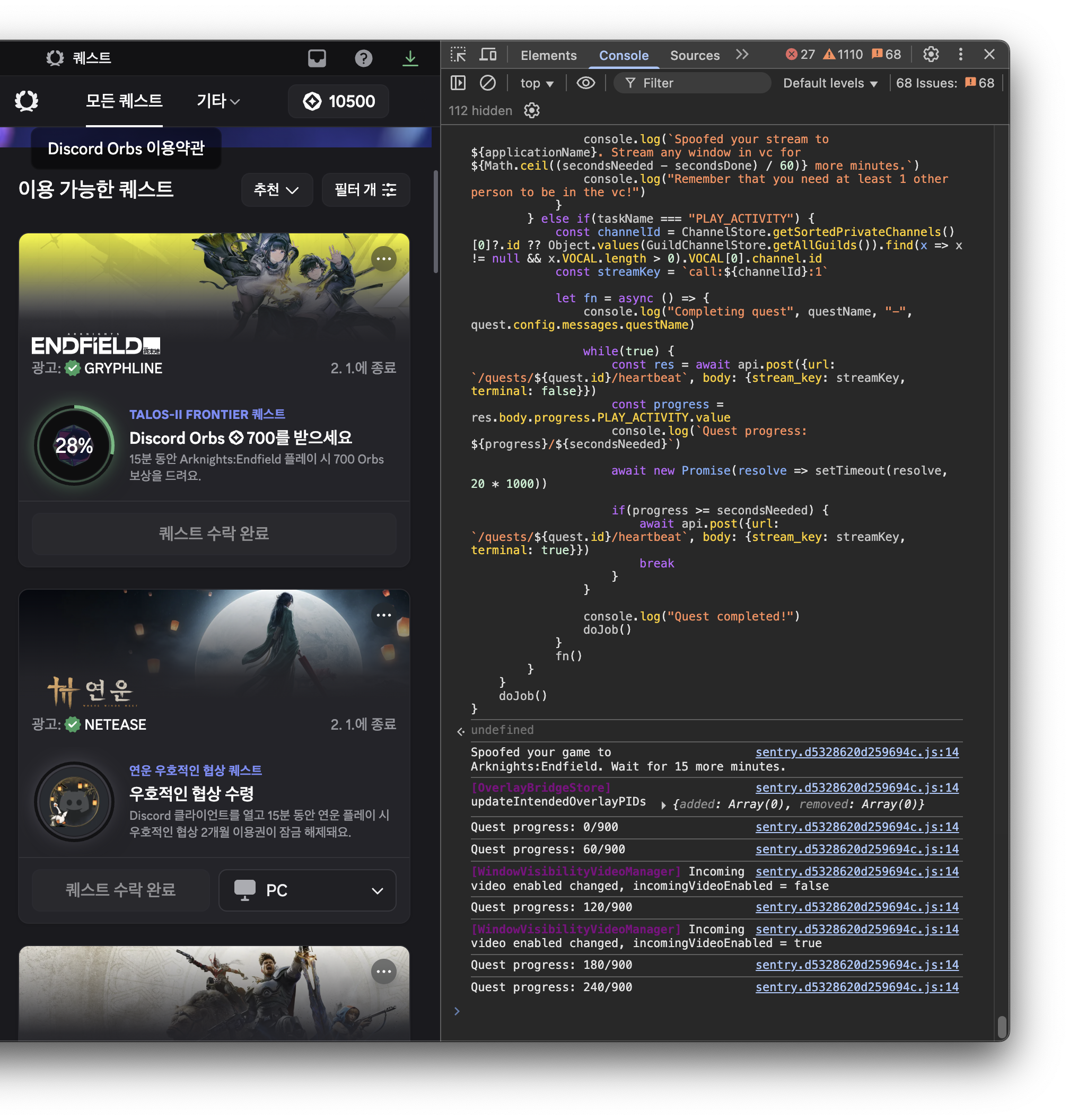
Paste the copied script in the console tab and execute it.
-
The script automatically completes the quest and you receive Orbs.
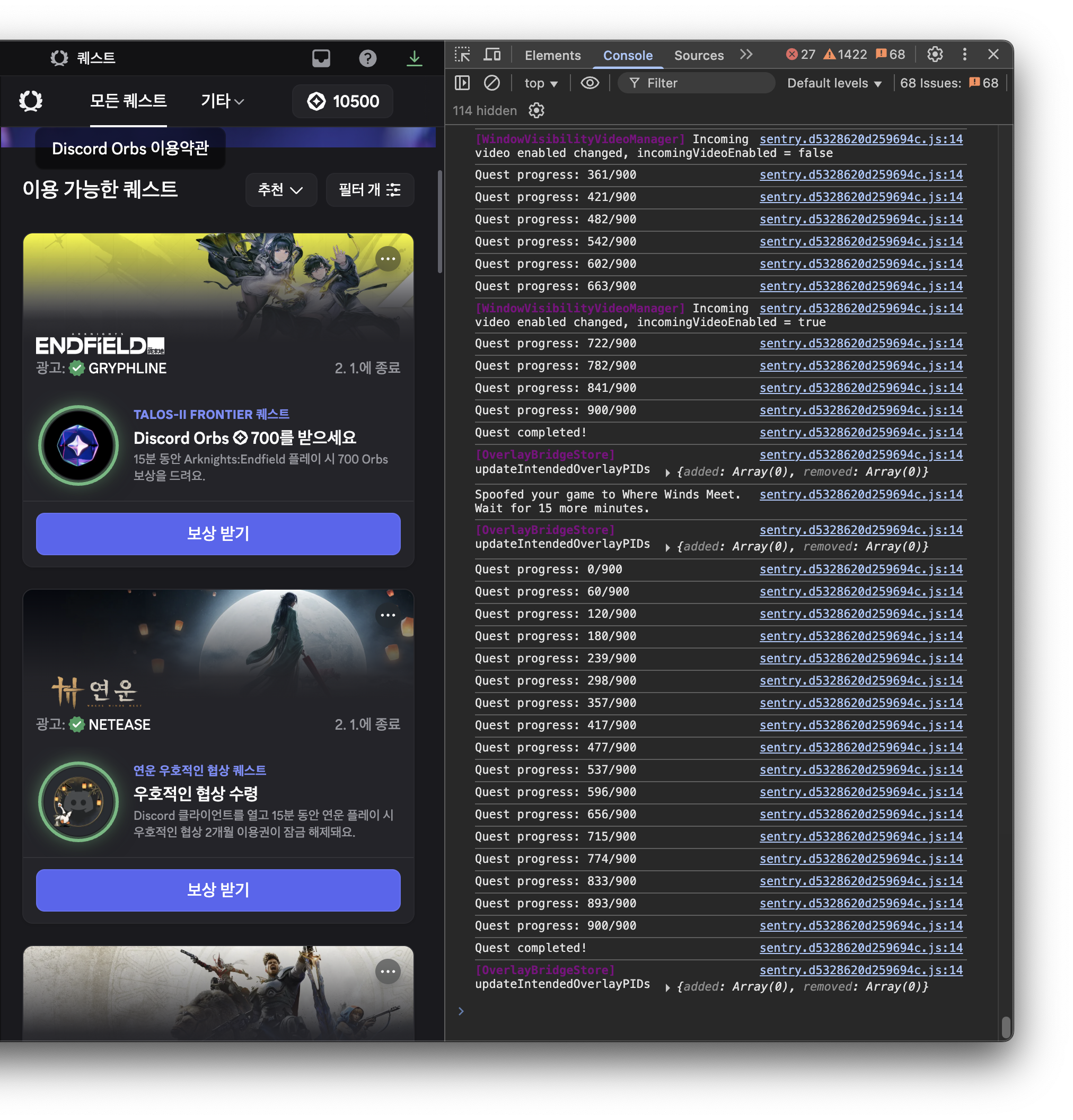
PC-exclusive quests that cannot be run on Mac were also completed without issues.
Conclusion
Using this script, you can complete Discord Orbs Quests without actually watching videos or playing games. Simply finding and using a script that someone already created saved a significant amount of time. It makes you realize there's nothing that doesn't exist on the internet.
However, remember that this method may violate Discord's Terms of Service. If you can accept risks such as account suspension, use it at your own responsibility.