Discord Orbs Quest 자동 완료하기

Discord Orbs 퀘스트를 영상 시청/게임플레이 없이 Orbs 보상받는 방법을 알아보자.
TL;DR
Discord Quest 자동 완료 스크립트를 사용하면 영상 시청이나 게임 플레이 없이 Orbs를 받을 수 있다.
개발자 도구 실행 -> 스크립트 붙여넣기 - > 퀘스트 완료
Discord Orbs 퀘스트란?
Discord에서는 Orbs라는 가상 화폐를 통해 다양한 아이템을 구매할 수 있다. Orbs는 Discord Quest를 완료하면 보상으로 받을 수 있는데, 이 퀘스트는 영상 시청이나 게임 플레이를 요구한다.
Discord Orbs 퀘스트의 유형과 보상
Discord Quest는 크게 두 가지 유형으로 나뉜다:
영상 시청형: 홍보 영상을 시청하는 퀘스트 (WATCH_VIDEO, WATCH_VIDEO_ON_MOBILE)
게임/프로그램 실행형: 특정 게임을 플레이하거나 스트리밍하는 퀘스트 (PLAY_ON_DESKTOP, STREAM_ON_DESKTOP, PLAY_ACTIVITY)
보상
- Discord Orbs: 대부분의 퀘스트는 700 Orbs를 보상으로 준다.
- 아바타 장식 / 프로필 효과
- 게임 코드 및 아이템
퀘스트를 클리어하지 않고 Orbs 받기
앞서 말했듯 Discord Orbs Quest는 영상 시청이나 게임 플레이를 요구한다. 하지만 두가지 방법으로 퀘스트를 클리어하지 않고도 Orbs를 받을 수 있다.
- 스크립트 이용
- 임의의 .exe 파일을 게임 실행 파일 이름으로 변경1
이 글에서는 스크립트 이용방법을 설명한다.
스크립트 이용하기
스크립트를 통한 퀘스트 수행은 Discord의 서비스 약관에 위배될 수 있으며, 계정 정지 등의 불이익을 받을 수 있다. 본인의 책임 하에 진행해야 한다.
인터넷을 검색해보면 이미 만들어진 훌륭한 해결책이 있다. Discord Orbs Quest를 자동으로 완료해주는 스크립트를 사용할 수 있는데, 이 스크립트는 퀘스트 시스템을 우회하여 자동으로 완료하고 Orbs를 지급받도록 도와준다. 모든 유형의 퀘스트를 지원한다.
스크립트 작동원리
- Discord 클라이언트의 내부 모듈 시스템에 접근
- 게임 실행 상태를 조작하거나 API 직접 호출
- 서버에 정상적인 진행 상태로 위장하여 전송
사전 설정
브라우저에서는 게임 실행 감지 기능이 제한되기 때문에 게임/프로그램 실행형 퀘스트를 완료하려면 Discord 데스크톱 앱이 필요하다.
그리고 스크립트 실행을 위해 개발자도구(DevTools)를 열어야 하는데, 보안 설정 때문에 Discord 데스크톱 앱에서는 기본적으로 DevTools를 열 수 없다. 따라서 다음 단계를 따라 설정해야 한다.
귀찮다면 방법2를 사용하자.
방법 1: Discord setting.json 파일 수정
- OS에 맞춰 아래 경로에 있는
settings.json파일을 연다.
macOS: ~/Library/Application Support/discord/settings.json
windows: %appdata%/discord/settings.json
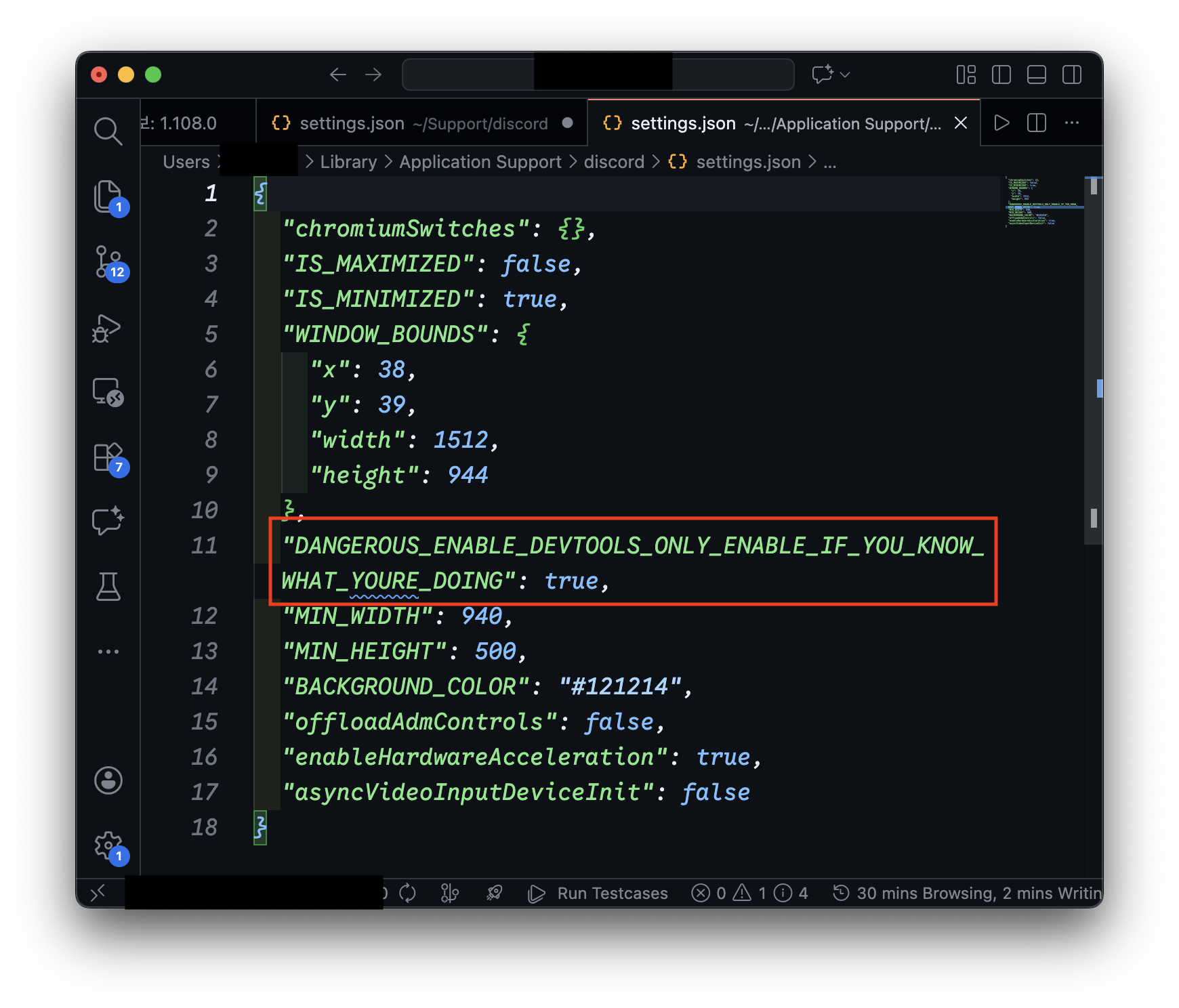
- 다음 내용을 추가한다.
{
// 기존 설정들...
  "DANGEROUS_ENABLE_DEVTOOLS_ONLY_ENABLE_IF_YOU_KNOW_WHAT_YOURE_DOING": true
}
- Discord 앱을 재시작한다.
방법2: Canary 또는 PTB 버전 사용
Discord의 Canary 또는 PTB(공개 테스트 빌드) 버전은 기본적으로 DevTools가 활성화되어있다. 이 버전을 설치하여 사용한다.
- canary
-1.png)
- PTB
스크립트 실행 방법


- 아래 코드 블록 / gist 페이지에서 스크립트 코드를 복사한다.
스크립트 코드 보기
delete window.$;
let wpRequire = webpackChunkdiscord_app.push([[Symbol()], {}, r => r]);
webpackChunkdiscord_app.pop();

let ApplicationStreamingStore = Object.values(wpRequire.c).find(x => x?.exports?.Z?.__proto__?.getStreamerActiveStreamMetadata)?.exports?.Z;
let RunningGameStore, QuestsStore, ChannelStore, GuildChannelStore, FluxDispatcher, api
if(!ApplicationStreamingStore) {
	ApplicationStreamingStore = Object.values(wpRequire.c).find(x => x?.exports?.A?.__proto__?.getStreamerActiveStreamMetadata).exports.A;
	RunningGameStore = Object.values(wpRequire.c).find(x => x?.exports?.Ay?.getRunningGames).exports.Ay;
	QuestsStore = Object.values(wpRequire.c).find(x => x?.exports?.A?.__proto__?.getQuest).exports.A;
	ChannelStore = Object.values(wpRequire.c).find(x => x?.exports?.A?.__proto__?.getAllThreadsForParent).exports.A;
	GuildChannelStore = Object.values(wpRequire.c).find(x => x?.exports?.Ay?.getSFWDefaultChannel).exports.Ay;
	FluxDispatcher = Object.values(wpRequire.c).find(x => x?.exports?.h?.__proto__?.flushWaitQueue).exports.h;
	api = Object.values(wpRequire.c).find(x => x?.exports?.Bo?.get).exports.Bo;
} else {
	RunningGameStore = Object.values(wpRequire.c).find(x => x?.exports?.ZP?.getRunningGames).exports.ZP;
	QuestsStore = Object.values(wpRequire.c).find(x => x?.exports?.Z?.__proto__?.getQuest).exports.Z;
	ChannelStore = Object.values(wpRequire.c).find(x => x?.exports?.Z?.__proto__?.getAllThreadsForParent).exports.Z;
	GuildChannelStore = Object.values(wpRequire.c).find(x => x?.exports?.ZP?.getSFWDefaultChannel).exports.ZP;
	FluxDispatcher = Object.values(wpRequire.c).find(x => x?.exports?.Z?.__proto__?.flushWaitQueue).exports.Z;
	api = Object.values(wpRequire.c).find(x => x?.exports?.tn?.get).exports.tn;
}

const supportedTasks = ["WATCH_VIDEO", "PLAY_ON_DESKTOP", "STREAM_ON_DESKTOP", "PLAY_ACTIVITY", "WATCH_VIDEO_ON_MOBILE"]
let quests = [...QuestsStore.quests.values()].filter(x => x.userStatus?.enrolledAt && !x.userStatus?.completedAt && new Date(x.config.expiresAt).getTime() > Date.now() && supportedTasks.find(y => Object.keys((x.config.taskConfig ?? x.config.taskConfigV2).tasks).includes(y)))
let isApp = typeof DiscordNative !== "undefined"
if(quests.length === 0) {
	console.log("You don't have any uncompleted quests!")
} else {
	let doJob = function() {
		const quest = quests.pop()
		if(!quest) return

		const pid = Math.floor(Math.random() * 30000) + 1000

		const applicationId = quest.config.application.id
		const applicationName = quest.config.application.name
		const questName = quest.config.messages.questName
		const taskConfig = quest.config.taskConfig ?? quest.config.taskConfigV2
		const taskName = supportedTasks.find(x => taskConfig.tasks[x] != null)
		const secondsNeeded = taskConfig.tasks[taskName].target
		let secondsDone = quest.userStatus?.progress?.[taskName]?.value ?? 0

		if(taskName === "WATCH_VIDEO" || taskName === "WATCH_VIDEO_ON_MOBILE") {
			const maxFuture = 10, speed = 7, interval = 1
			const enrolledAt = new Date(quest.userStatus.enrolledAt).getTime()
			let completed = false
			let fn = async () => {
				while(true) {
					const maxAllowed = Math.floor((Date.now() - enrolledAt)/1000) + maxFuture
					const diff = maxAllowed - secondsDone
					const timestamp = secondsDone + speed
					if(diff >= speed) {
						const res = await api.post({url: `/quests/${quest.id}/video-progress`, body: {timestamp: Math.min(secondsNeeded, timestamp + Math.random())}})
						completed = res.body.completed_at != null
						secondsDone = Math.min(secondsNeeded, timestamp)
					}

					if(timestamp >= secondsNeeded) {
						break
					}
					await new Promise(resolve => setTimeout(resolve, interval * 1000))
				}
				if(!completed) {
					await api.post({url: `/quests/${quest.id}/video-progress`, body: {timestamp: secondsNeeded}})
				}
				console.log("Quest completed!")
				doJob()
			}
			fn()
			console.log(`Spoofing video for ${questName}.`)
		} else if(taskName === "PLAY_ON_DESKTOP") {
			if(!isApp) {
				console.log("This no longer works in browser for non-video quests. Use the discord desktop app to complete the", questName, "quest!")
			} else {
				api.get({url: `/applications/public?application_ids=${applicationId}`}).then(res => {
					const appData = res.body[0]
					const exeName = appData.executables.find(x => x.os === "win32").name.replace(">","")

					const fakeGame = {
						cmdLine: `C:\\Program Files\\${appData.name}\\${exeName}`,
						exeName,
						exePath: `c:/program files/${appData.name.toLowerCase()}/${exeName}`,
						hidden: false,
						isLauncher: false,
						id: applicationId,
						name: appData.name,
						pid: pid,
						pidPath: [pid],
						processName: appData.name,
						start: Date.now(),
					}
					const realGames = RunningGameStore.getRunningGames()
					const fakeGames = [fakeGame]
					const realGetRunningGames = RunningGameStore.getRunningGames
					const realGetGameForPID = RunningGameStore.getGameForPID
					RunningGameStore.getRunningGames = () => fakeGames
					RunningGameStore.getGameForPID = (pid) => fakeGames.find(x => x.pid === pid)
					FluxDispatcher.dispatch({type: "RUNNING_GAMES_CHANGE", removed: realGames, added: [fakeGame], games: fakeGames})

					let fn = data => {
						let progress = quest.config.configVersion === 1 ? data.userStatus.streamProgressSeconds : Math.floor(data.userStatus.progress.PLAY_ON_DESKTOP.value)
						console.log(`Quest progress: ${progress}/${secondsNeeded}`)

						if(progress >= secondsNeeded) {
							console.log("Quest completed!")

							RunningGameStore.getRunningGames = realGetRunningGames
							RunningGameStore.getGameForPID = realGetGameForPID
							FluxDispatcher.dispatch({type: "RUNNING_GAMES_CHANGE", removed: [fakeGame], added: [], games: []})
							FluxDispatcher.unsubscribe("QUESTS_SEND_HEARTBEAT_SUCCESS", fn)

							doJob()
						}
					}
					FluxDispatcher.subscribe("QUESTS_SEND_HEARTBEAT_SUCCESS", fn)

					console.log(`Spoofed your game to ${applicationName}. Wait for ${Math.ceil((secondsNeeded - secondsDone) / 60)} more minutes.`)
				})
			}
		} else if(taskName === "STREAM_ON_DESKTOP") {
			if(!isApp) {
				console.log("This no longer works in browser for non-video quests. Use the discord desktop app to complete the", questName, "quest!")
			} else {
				let realFunc = ApplicationStreamingStore.getStreamerActiveStreamMetadata
				ApplicationStreamingStore.getStreamerActiveStreamMetadata = () => ({
					id: applicationId,
					pid,
					sourceName: null
				})

				let fn = data => {
					let progress = quest.config.configVersion === 1 ? data.userStatus.streamProgressSeconds : Math.floor(data.userStatus.progress.STREAM_ON_DESKTOP.value)
					console.log(`Quest progress: ${progress}/${secondsNeeded}`)

					if(progress >= secondsNeeded) {
						console.log("Quest completed!")

						ApplicationStreamingStore.getStreamerActiveStreamMetadata = realFunc
						FluxDispatcher.unsubscribe("QUESTS_SEND_HEARTBEAT_SUCCESS", fn)

						doJob()
					}
				}
				FluxDispatcher.subscribe("QUESTS_SEND_HEARTBEAT_SUCCESS", fn)

				console.log(`Spoofed your stream to ${applicationName}. Stream any window in vc for ${Math.ceil((secondsNeeded - secondsDone) / 60)} more minutes.`)
				console.log("Remember that you need at least 1 other person to be in the vc!")
			}
		} else if(taskName === "PLAY_ACTIVITY") {
			const channelId = ChannelStore.getSortedPrivateChannels()[0]?.id ?? Object.values(GuildChannelStore.getAllGuilds()).find(x => x != null && x.VOCAL.length > 0).VOCAL[0].channel.id
			const streamKey = `call:${channelId}:1`

			let fn = async () => {
				console.log("Completing quest", questName, "-", quest.config.messages.questName)

				while(true) {
					const res = await api.post({url: `/quests/${quest.id}/heartbeat`, body: {stream_key: streamKey, terminal: false}})
					const progress = res.body.progress.PLAY_ACTIVITY.value
					console.log(`Quest progress: ${progress}/${secondsNeeded}`)

					await new Promise(resolve => setTimeout(resolve, 20 * 1000))

					if(progress >= secondsNeeded) {
						await api.post({url: `/quests/${quest.id}/heartbeat`, body: {stream_key: streamKey, terminal: true}})
						break
					}
				}

				console.log("Quest completed!")
				doJob()
			}
			fn()
		}
	}
	doJob()
}
코드 이해용으로 단 주석 버전(by Claude)
/*
============================================================
 * 기능: Discord의 Quest 시스템을 우회하여 자동 완료
 * 지원 Quest 유형:
 * - WATCH_VIDEO / WATCH_VIDEO_ON_MOBILE: 비디오 시청
 * - PLAY_ON_DESKTOP: 게임 실행
 * - STREAM_ON_DESKTOP: 화면 공유
 * - PLAY_ACTIVITY: 음성 채널 액티비티
 *
 * 작동 원리:
 * 1. Discord 클라이언트의 내부 모듈 시스템에 접근
 * 2. 게임 실행 상태를 조작하거나 API 직접 호출
 * 3. 서버에 정상적인 진행 상태로 위장하여 전송
 * ============================================================
 */

// ============================================================
// 0. 환경 초기화
// ============================================================
// jQuery 등 다른 라이브러리와의 충돌 방지를 위해 전역 변수 $ 제거
delete window.$;


// ============================================================
// 1. Webpack 모듈 로더(require 함수) 탈취
// ============================================================
// Discord는 Webpack으로 번들링되어 있으며, 모든 내부 모듈은
// webpackChunkdiscord_app 배열을 통해 관리됩니다.
// 이 배열에 임시 모듈을 push하여 require 함수를 추출합니다.
let wpRequire = webpackChunkdiscord_app.push([
    [Symbol()],  // 고유 식별자
    {},          // 빈 모듈 정의
    r => r       // require 함수를 반환하는 콜백
]);
webpackChunkdiscord_app.pop(); // 주입했던 임시 모듈 제거 (흔적 제거)


// ============================================================
// 2. 필요한 내부 Store 및 유틸리티 모듈 탐색
// ============================================================
// Discord 내부 코드는 난독화되어 있고 버전마다 구조가 다를 수 있습니다.
// 특정 메서드 시그니처를 가진 모듈을 찾아 필요한 Store를 추출합니다.

// ApplicationStreamingStore: 화면 공유(스트리밍) 상태 관리
let ApplicationStreamingStore = Object.values(wpRequire.c).find(
    x => x?.exports?.Z?.__proto__?.getStreamerActiveStreamMetadata
)?.exports?.Z;

// 나머지 Store들을 담을 변수 선언
let RunningGameStore,      // 실행 중인 게임 목록 관리
    QuestsStore,           // Quest 정보 및 진행 상태 관리
    ChannelStore,          // 채널 정보 관리
    GuildChannelStore,     // 길드(서버) 채널 정보 관리
    FluxDispatcher,        // 이벤트 발행/구독 시스템
    api;                   // HTTP API 클라이언트


// ============================================================
// 2-1. 모듈 Export 패턴 분기 처리
// ============================================================
// Discord 버전에 따라 모듈이 exports.A 또는 exports.Z 등에 위치할 수 있습니다.
// 두 가지 패턴을 모두 지원하여 호환성을 확보합니다.

if(!ApplicationStreamingStore) {
    // Pattern A: exports.A, exports.Ay, exports.h, exports.Bo
    // (일부 Discord 버전에서 사용)
    ApplicationStreamingStore = Object.values(wpRequire.c).find(
        x => x?.exports?.A?.__proto__?.getStreamerActiveStreamMetadata
    ).exports.A;

    RunningGameStore = Object.values(wpRequire.c).find(
        x => x?.exports?.Ay?.getRunningGames
    ).exports.Ay;

    QuestsStore = Object.values(wpRequire.c).find(
        x => x?.exports?.A?.__proto__?.getQuest
    ).exports.A;

    ChannelStore = Object.values(wpRequire.c).find(
        x => x?.exports?.A?.__proto__?.getAllThreadsForParent
    ).exports.A;

    GuildChannelStore = Object.values(wpRequire.c).find(
        x => x?.exports?.Ay?.getSFWDefaultChannel
    ).exports.Ay;

    FluxDispatcher = Object.values(wpRequire.c).find(
        x => x?.exports?.h?.__proto__?.flushWaitQueue
    ).exports.h;

    api = Object.values(wpRequire.c).find(
        x => x?.exports?.Bo?.get
    ).exports.Bo;

} else {
    // Pattern B: exports.Z, exports.ZP, exports.tn
    // (대부분의 Discord 버전에서 사용)
    RunningGameStore = Object.values(wpRequire.c).find(
        x => x?.exports?.ZP?.getRunningGames
    ).exports.ZP;

    QuestsStore = Object.values(wpRequire.c).find(
        x => x?.exports?.Z?.__proto__?.getQuest
    ).exports.Z;

    ChannelStore = Object.values(wpRequire.c).find(
        x => x?.exports?.Z?.__proto__?.getAllThreadsForParent
    ).exports.Z;

    GuildChannelStore = Object.values(wpRequire.c).find(
        x => x?.exports?.ZP?.getSFWDefaultChannel
    ).exports.ZP;

    FluxDispatcher = Object.values(wpRequire.c).find(
        x => x?.exports?.Z?.__proto__?.flushWaitQueue
    ).exports.Z;

    api = Object.values(wpRequire.c).find(
        x => x?.exports?.tn?.get
    ).exports.tn;
}


// ============================================================
// 3. 수행 가능한 Quest 목록 필터링
// ============================================================
// 이 스크립트가 처리할 수 있는 Quest 작업 유형 정의
const supportedTasks = [
    "WATCH_VIDEO",              // 비디오 시청 (브라우저/앱)
    "PLAY_ON_DESKTOP",          // 게임 실행 (앱 전용)
    "STREAM_ON_DESKTOP",        // 화면 공유 (앱 전용)
    "PLAY_ACTIVITY",            // 액티비티 참여
    "WATCH_VIDEO_ON_MOBILE"     // 모바일 비디오 시청
];

// QuestsStore에서 현재 진행 가능한 Quest 추출
// 필터링 조건:
// 1. 등록됨 (userStatus.enrolledAt 존재)
// 2. 미완료 (!userStatus.completedAt)
// 3. 기간 만료 전 (config.expiresAt > 현재 시각)
// 4. 지원하는 작업 유형 포함
let quests = [...QuestsStore.quests.values()].filter(x =>
    x.userStatus?.enrolledAt &&
    !x.userStatus?.completedAt &&
    new Date(x.config.expiresAt).getTime() > Date.now() &&
    supportedTasks.find(y =>
        Object.keys((x.config.taskConfig ?? x.config.taskConfigV2).tasks).includes(y)
    )
);

// 실행 환경 감지
// DiscordNative 객체 존재 여부로 데스크톱 앱/브라우저 구분
let isApp = typeof DiscordNative !== "undefined";


// ============================================================
// 4. Quest 수행 메인 로직
// ============================================================
if(quests.length === 0) {
    // 수행할 Quest가 없는 경우
    console.log("You don't have any uncompleted quests!");

} else {
    // --------------------------------------------------------
    // 4-1. Quest 순차 처리 함수 (재귀 호출)
    // --------------------------------------------------------
    let doJob = function() {
        const quest = quests.pop(); // 배열에서 Quest 하나를 가져옴
        if(!quest) return; // 모든 Quest 완료 시 종료

        // 가짜 프로세스 ID 생성 (1000~30999 범위)
        const pid = Math.floor(Math.random() * 30000) + 1000;

        // Quest 설정값 추출
        const applicationId = quest.config.application.id;           // 대상 앱 ID
        const applicationName = quest.config.application.name;       // 대상 앱 이름
        const questName = quest.config.messages.questName;           // Quest 표시 이름
        const taskConfig = quest.config.taskConfig ?? quest.config.taskConfigV2;  // 작업 설정
        const taskName = supportedTasks.find(x => taskConfig.tasks[x] != null);   // 실제 작업 유형
        const secondsNeeded = taskConfig.tasks[taskName].target;     // 목표 시간(초)
        let secondsDone = quest.userStatus?.progress?.[taskName]?.value ?? 0;  // 현재 진행 시간


        // ========================================================
        // [CASE 1] 비디오 시청 Quest
        // ========================================================
        if(taskName === "WATCH_VIDEO" || taskName === "WATCH_VIDEO_ON_MOBILE") {
            // 시청 진행 시뮬레이션 파라미터
            const maxFuture = 10;   // 서버가 허용하는 미래 타임스탬프 허용치 (초)
            const speed = 7;        // 각 요청당 진행시킬 시간 (초)
            const interval = 1;     // API 요청 간격 (초)

            const enrolledAt = new Date(quest.userStatus.enrolledAt).getTime();
            let completed = false;

            let fn = async () => {
                while(true) {
                    // 서버 측 타임스탬프 검증 우회
                    // Quest 등록 후 경과 시간을 기준으로 "허용 가능한 최대 진행 시간" 계산
                    const maxAllowed = Math.floor((Date.now() - enrolledAt) / 1000) + maxFuture;
                    const diff = maxAllowed - secondsDone;
                    const timestamp = secondsDone + speed;

                    if(diff >= speed) {
                        // Discord Quest API 호출
                        // POST /quests/{quest_id}/video-progress
                        // - body: { timestamp: number } - 현재 비디오 시청 시간(초)
                        // - response: { completed_at: string | null } - 완료 시각
                        const res = await api.post({
                            url: `/quests/${quest.id}/video-progress`,
                            body: {timestamp: Math.min(secondsNeeded, timestamp + Math.random())}
                        });
                        completed = res.body.completed_at != null;
                        secondsDone = Math.min(secondsNeeded, timestamp);
                    }

                    // 목표 시간 도달 시 루프 종료
                    if(timestamp >= secondsNeeded) {
                        break;
                    }

                    // 다음 요청까지 대기
                    await new Promise(resolve => setTimeout(resolve, interval * 1000));
                }

                // 완료 확정 요청 (completed_at이 null인 경우)
                if(!completed) {
                    await api.post({
                        url: `/quests/${quest.id}/video-progress`,
                        body: {timestamp: secondsNeeded}
                    });
                }

                console.log("Quest completed!");
                doJob(); // 다음 Quest 수행
            };

            fn();
            console.log(`Spoofing video for ${questName}.`);


        // ========================================================
        // [CASE 2] 데스크톱 게임 실행 Quest
        // ========================================================
        } else if(taskName === "PLAY_ON_DESKTOP") {
            if(!isApp) {
                // 브라우저에서는 게임 감지 기능을 사용할 수 없음
                console.log("This no longer works in browser for non-video quests. Use the discord desktop app to complete the", questName, "quest!");
            } else {
                // 대상 애플리케이션의 실행 파일 정보 조회
                // GET /applications/public?application_ids={id}
                api.get({url: `/applications/public?application_ids=${applicationId}`}).then(res => {
                    const appData = res.body[0];
                    const exeName = appData.executables.find(x => x.os === "win32").name.replace(">","");

                    // 가짜 게임 프로세스 데이터 생성
                    // Discord가 게임을 감지할 때 저장하는 형식과 동일하게 구성
                    const fakeGame = {
                        cmdLine: `C:\\Program Files\\${appData.name}\\${exeName}`,
                        exeName,
                        exePath: `c:/program files/${appData.name.toLowerCase()}/${exeName}`,
                        hidden: false,
                        isLauncher: false,
                        id: applicationId,
                        name: appData.name,
                        pid: pid,
                        pidPath: [pid],
                        processName: appData.name,
                        start: Date.now(),
                    };

                    // 원본 함수 백업 (나중에 복구용)
                    const realGames = RunningGameStore.getRunningGames();
                    const fakeGames = [fakeGame];
                    const realGetRunningGames = RunningGameStore.getRunningGames;
                    const realGetGameForPID = RunningGameStore.getGameForPID;

                    // Monkey Patching (런타임 함수 대체)
                    // RunningGameStore의 메서드를 일시적으로 덮어씌워
                    // Discord가 실제로는 실행되지 않은 게임을 실행 중으로 인식하도록 속입니다.
                    RunningGameStore.getRunningGames = () => fakeGames;
                    RunningGameStore.getGameForPID = (pid) => fakeGames.find(x => x.pid === pid);

                    // Flux 이벤트 발행: 게임 상태 변경 알림
                    // Discord 클라이언트 전체에 "새 게임이 실행되었다"는 이벤트를 전파
                    FluxDispatcher.dispatch({
                        type: "RUNNING_GAMES_CHANGE",
                        removed: realGames,
                        added: [fakeGame],
                        games: fakeGames
                    });

                    // Quest 하트비트 성공 이벤트 구독
                    // Discord는 주기적으로 Quest 진행 상황을 서버에 전송(하트비트)하며,
                    // 성공 시 이 이벤트가 발생합니다.
                    let fn = data => {
                        // 진행률 추출 (config 버전에 따라 경로가 다름)
                        let progress = quest.config.configVersion === 1
                            ? data.userStatus.streamProgressSeconds
                            : Math.floor(data.userStatus.progress.PLAY_ON_DESKTOP.value);

                        console.log(`Quest progress: ${progress}/${secondsNeeded}`);

                        if(progress >= secondsNeeded) {
                            console.log("Quest completed!");

                            // Cleanup: 원본 함수 복구
                            RunningGameStore.getRunningGames = realGetRunningGames;
                            RunningGameStore.getGameForPID = realGetGameForPID;

                            // 게임 종료 상태로 이벤트 발행
                            FluxDispatcher.dispatch({
                                type: "RUNNING_GAMES_CHANGE",
                                removed: [fakeGame],
                                added: [],
                                games: []
                            });

                            // 이벤트 구독 해제
                            FluxDispatcher.unsubscribe("QUESTS_SEND_HEARTBEAT_SUCCESS", fn);

                            doJob(); // 다음 Quest 수행
                        }
                    };

                    // 이벤트 구독 시작
                    FluxDispatcher.subscribe("QUESTS_SEND_HEARTBEAT_SUCCESS", fn);

                    console.log(`Spoofed your game to ${applicationName}. Wait for ${Math.ceil((secondsNeeded - secondsDone) / 60)} more minutes.`);
                });
            }


        // ========================================================
        // [CASE 3] 화면 공유(스트리밍) Quest
        // ========================================================
        } else if(taskName === "STREAM_ON_DESKTOP") {
            if(!isApp) {
                console.log("This no longer works in browser for non-video quests. Use the discord desktop app to complete the", questName, "quest!");
            } else {
                // 원본 함수 백업
                let realFunc = ApplicationStreamingStore.getStreamerActiveStreamMetadata;

                // Monkey Patching: 스트리밍 메타데이터 위조
                // Discord가 스트리밍 상태를 확인할 때 호출하는 함수를 덮어씌워
                // 실제로는 스트리밍하지 않지만 특정 앱을 스트리밍 중인 것처럼 반환
                ApplicationStreamingStore.getStreamerActiveStreamMetadata = () => ({
                    id: applicationId,  // 목표 애플리케이션 ID
                    pid,                // 가짜 프로세스 ID
                    sourceName: null    // 스트리밍 소스 이름
                });

                // Quest 하트비트 성공 이벤트 구독
                let fn = data => {
                    let progress = quest.config.configVersion === 1
                        ? data.userStatus.streamProgressSeconds
                        : Math.floor(data.userStatus.progress.STREAM_ON_DESKTOP.value);

                    console.log(`Quest progress: ${progress}/${secondsNeeded}`);

                    if(progress >= secondsNeeded) {
                        console.log("Quest completed!");

                        // 원본 함수 복구
                        ApplicationStreamingStore.getStreamerActiveStreamMetadata = realFunc;

                        // 이벤트 구독 해제
                        FluxDispatcher.unsubscribe("QUESTS_SEND_HEARTBEAT_SUCCESS", fn);

                        doJob(); // 다음 Quest 수행
                    }
                };

                FluxDispatcher.subscribe("QUESTS_SEND_HEARTBEAT_SUCCESS", fn);

                console.log(`Spoofed your stream to ${applicationName}. Stream any window in vc for ${Math.ceil((secondsNeeded - secondsDone) / 60)} more minutes.`);
                console.log("Remember that you need at least 1 other person to be in the vc!");
            }


        // ========================================================
        // [CASE 4] 액티비티 참여 Quest
        // ========================================================
        } else if(taskName === "PLAY_ACTIVITY") {
            // 활성화된 음성 채널 찾기
            // DM 채널 우선, 없으면 길드의 음성 채널 사용
            const channelId = ChannelStore.getSortedPrivateChannels()[0]?.id
                ?? Object.values(GuildChannelStore.getAllGuilds())
                    .find(x => x != null && x.VOCAL.length > 0)
                    .VOCAL[0].channel.id;

            // 스트림 키 생성 (채널 ID 기반)
            const streamKey = `call:${channelId}:1`;

            let fn = async () => {
                console.log("Completing quest", questName, "-", quest.config.messages.questName);

                while(true) {
                    // Discord Quest API에 직접 하트비트 전송
                    // POST /quests/{quest_id}/heartbeat
                    // - body: { stream_key: string, terminal: boolean }
                    // - stream_key: 음성 채널 식별자
                    // - terminal: 완료 신호 (false=진행 중, true=완료)
                    const res = await api.post({
                        url: `/quests/${quest.id}/heartbeat`,
                        body: {stream_key: streamKey, terminal: false}
                    });

                    const progress = res.body.progress.PLAY_ACTIVITY.value;
                    console.log(`Quest progress: ${progress}/${secondsNeeded}`);

                    // 20초 대기 (Discord의 하트비트 주기와 유사)
                    await new Promise(resolve => setTimeout(resolve, 20 * 1000));

                    if(progress >= secondsNeeded) {
                        // 완료 신호 전송 (terminal: true)
                        await api.post({
                            url: `/quests/${quest.id}/heartbeat`,
                            body: {stream_key: streamKey, terminal: true}
                        });
                        break;
                    }
                }

                console.log("Quest completed!");
                doJob(); // 다음 Quest 수행
            };

            fn();
        }
    };

    // --------------------------------------------------------
    // Quest 처리 시작
    // --------------------------------------------------------
    doJob();
}
-
원하는 퀘스트 수락하기
- 스크립트를 입력하기 전 본인이 원하는 퀘스트를 수락한다.
- 한번에 여러개의 퀘스트를 수락해도 된다.
-
Discord 클라이언트에서 개발자 도구(DevTools)를 연다.
- 단축키:
Ctrl + Shift + I(Windows) /Cmd + Option + I(macOS)
- 단축키:
-
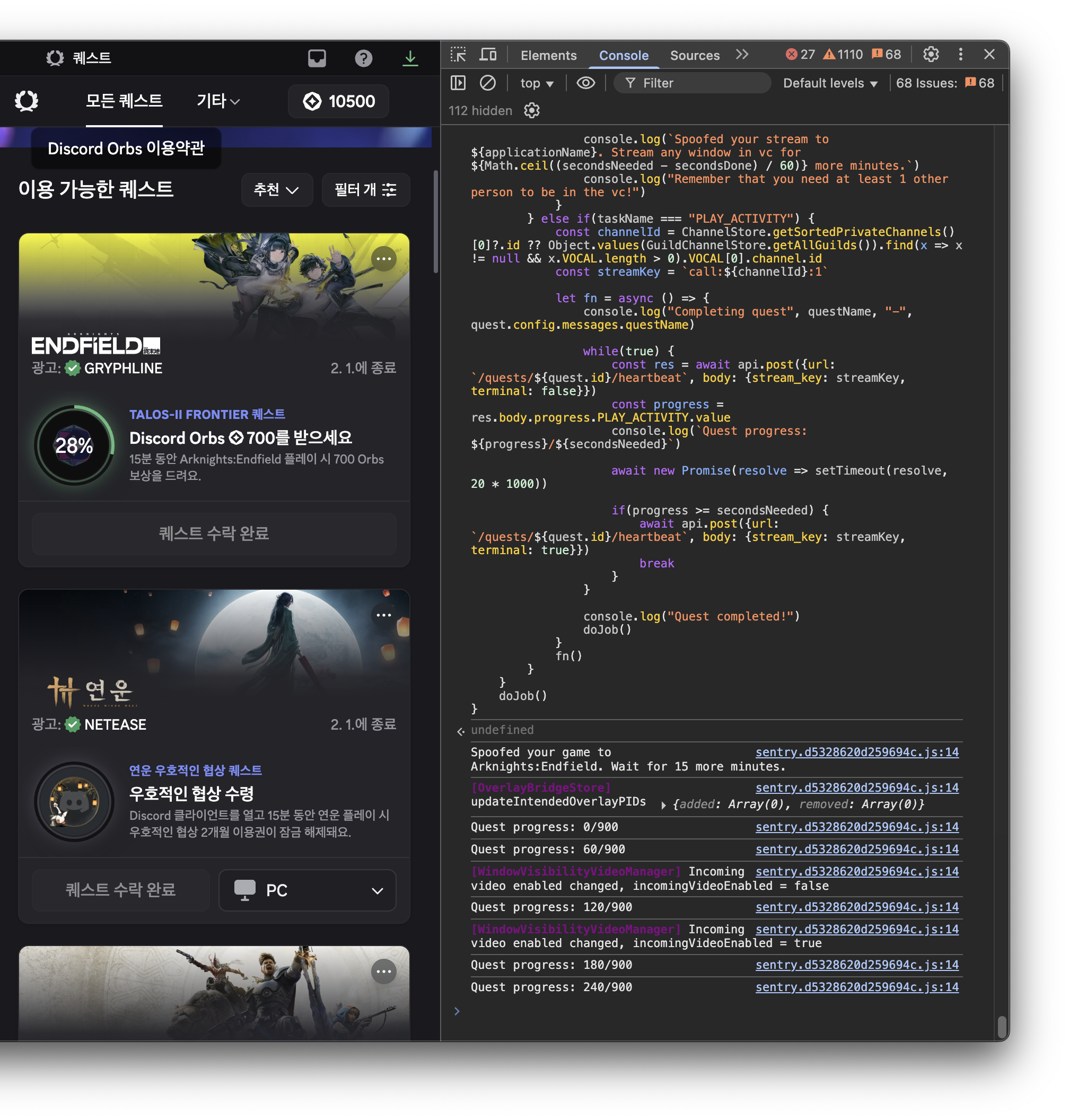
콘솔 탭에서 복사한 스크립트를 붙여넣고 실행한다.
-
스크립트가 자동으로 퀘스트를 완료하고 Orbs를 지급받는다.
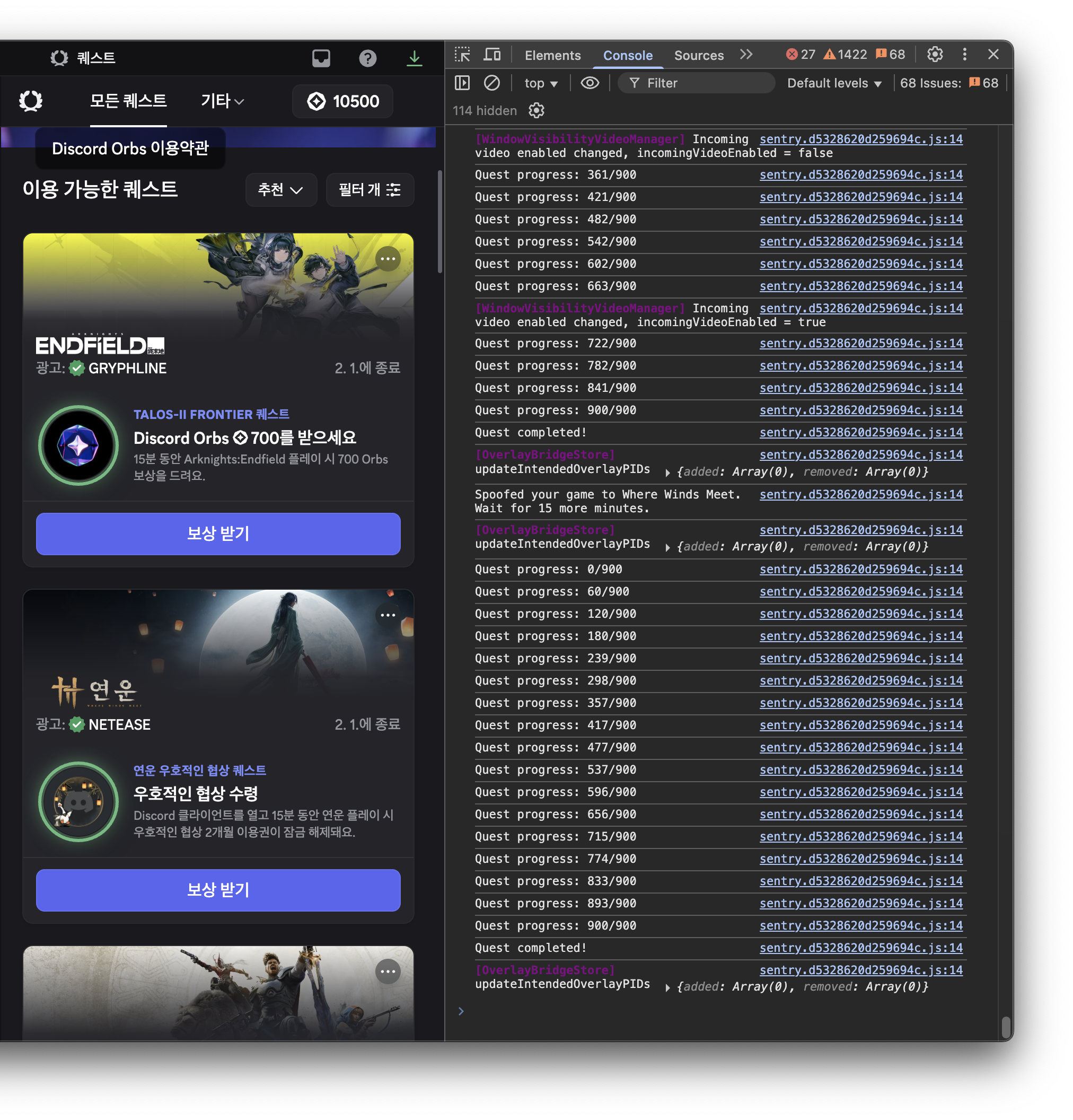
맥에서는 실행할 수 없는 PC 전용 퀘스트도 문제없이 완료되었다.
결론
이 스크립트를 활용하면 실제로 영상을 시청하거나 게임을 플레이하지 않고도 Discord Orbs Quest를 완료할 수 있다. 이미 누군가가 만들어둔 스크립트를 찾아 사용하는 것만으로도 시간을 크게 절약할 수 있었다. 역시 인터넷에는 없는 게 없다는 생각이 든다.
다만 이러한 방법은 Discord의 서비스 약관에 위배될 가능성이 있다는 점을 잊지 말아야 한다. 계정 정지 등의 위험을 감수할 수 있다면 본인의 책임 하에 사용하도록 하자.